Check whether any link on a webpage is dofollow, nofollow, sponsored or UGC with our free link checker. See every link on the page, how many appear within the main article content, and download the full report as a CSV file.
You'll also see whether the page can be indexed, whether search engines are allowed to follow its links, and useful signals to help you judge whether a backlink from that page is worth having.
Free to use. No sign-up required.
The free AnyBacklink browser extension gives you the same backlink report without needing to copy web addresses into a separate tool; we colour-code every link on the page too.
Our link checker also works on websites that block web-based checkers; it'll also see links added using JavaScript, and has no daily limit.
Get the free extension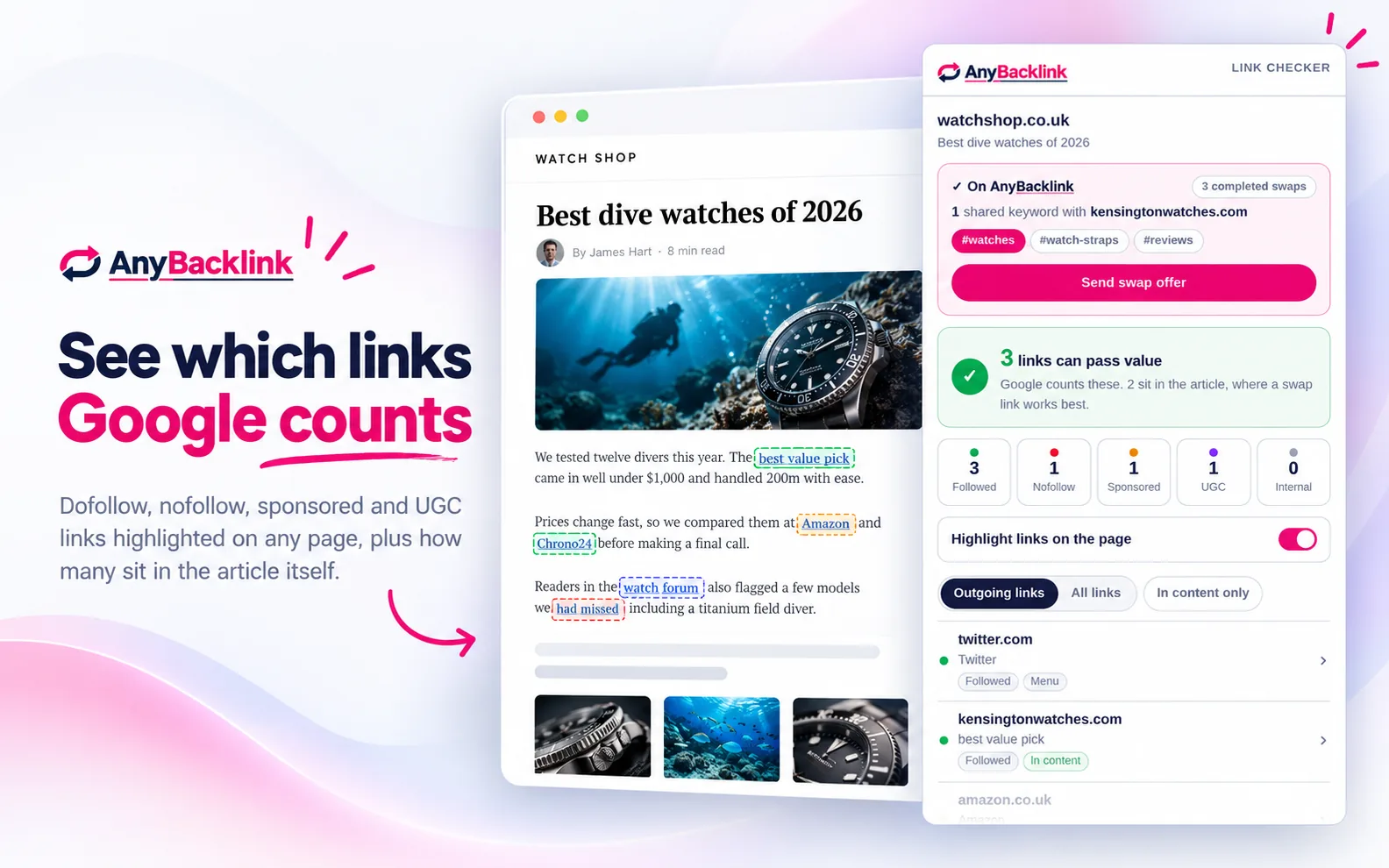
See how many dofollow links on the webpage point to other websites. These followed external links can pass ranking signals to the pages they link to.
Dofollow links placed naturally within a page’s main content are generally more valuable than links in footers, navigation menus or sidebar widgets. Our backlink checker shows how many followed external links appear within the main content of the page.
A backlink may be far less useful if the page tells search engines not to index it or not to follow its links. The AnyBacklink checker flags these warnings so you can spot potential issues before pursuing a backlink.
The checker sorts every link on the page into dofollow, nofollow, sponsored and UGC categories, while separating internal links from links pointing to other websites. Dofollow external links are the ones most likely to pass ranking signals, particularly when they appear naturally within the page's main content.
Followed (dofollow)
A normal link with no rel label. Google can follow it and count it as a vote for the page it points to.
Nofollow
Marked rel="nofollow". A hint to Google not to count it, so it usually passes little or no value.
Sponsored
Marked rel="sponsored". For paid placements and affiliate links. Not counted as a vote.
UGC
Marked rel="ugc". Links left by users in comments and forums. Usually passes little value.
Internal
Links to other pages on the same site. Useful to that site, but not a backlink to anyone.
Want the detail? Read our dofollow vs nofollow guide.
Paste the address of the page that holds the link into the checker at the top of this page and press Check links. Every link on the page is listed as followed, nofollow, sponsored, UGC or internal.
Click the Nofollow count to show only the nofollow links.
Paste the webpage into the backlink checker and look for that link in the list we provide. Anything marked 'Followed' is a dofollow link. We also show if it's nofollow, sponsored or UGC.
Click the 'Followed' filter to show only dofollow links, and turn on 'In content only' to see the links within the content; these are worth the most.
A dofollow link is simply a normal link with no rel label. It can pass ranking value to the page it points to. A nofollow link carries rel="nofollow", which asks Google not to count it.
Our dofollow vs nofollow guide covers when each is used and what it means for backlinks.
Yes. Once you've got your results, simply click on Download CSV to save every backlink on the page. We'll provide you with a spreadsheet that includes the web address, link text, type (dofollow, nofollow, sponsored, UGC or internal), and where on the page it sits. It opens in Excel, Google Sheets or Numbers.
Not entirely. Google treats nofollow as a hint rather than a rule, and nofollow links can still send visitors. But for building rankings, a followed link from a relevant page is worth far more.
Some sites use bot protection that stops tools like web-based link checkers from reading the page. The free browser extension still works on those sites, because it reads the page in your own browser.
Some websites add links with JavaScript after the page has loaded, such as comment sections and widgets. An online checker reads the page before that happens, so it can miss them.
This is why you should add our free browser extension: it reads the finished page in your browser, so it picks these links up.
Yes, our link checker is 100% free to use.
Add the free AnyBacklink extension and check dofollow and nofollow links in one click. It works on sites that block online checkers, picks up links added by JavaScript, and has no limit.
Get the free extension